Beady, the Mac app this post ends up at, now installs with Homebrew. You need macOS 15 or later on Apple silicon, and bd on your PATH (brew install beads):
| |
The app is ad-hoc signed but not notarized (there’s no Apple Developer ID behind it), so macOS quarantines it the first time. Open it, then choose Open Anyway in System Settings → Privacy & Security. That’s once; Homebrew keeps the approval across upgrades. brew upgrade picks up new releases, and brew uninstall --zap beady removes the app along with its views and settings. On an Intel Mac, build it from source instead: that’s a clone and one script (the commands are at the end of this post), and a self-built app is never quarantined.
The rest of this post is why it exists.
I run several agents at once against the same repo on my own machine. That works right up until two of them decide to work on the same thing, like a feature or a bug, or one starts a refactor that another is already halfway through.
You know you’ve hit this when you’ve got multiple sessions happily coding away, but when you try to merge changes from those sessions (and git worktrees), the whole thing comes crashing back to reality with a ton of implementations that overlap, solve the same problem in different ways, and so on. It’s the equivalent of having two engineers grab the same issue from the backlog at the same time, implement the feature or fix, then push in different branches. It’s not pretty!
My first attempt at fixing it was GitHub issues. Agents can read them, claim them, close them, and nothing explodes. The cost is all in the noise. Every claim is an assignment change, every handoff is a comment, and a tracker built for humans has no cheap way to say “this piece of work is blocked on those two.” So I spent my time shuffling ownership around to keep agents off each other, and reconstructing a dependency graph in my head to work out what more than one of them could safely pick up at once.
GitHub issues is great for humans, and a poor orchestration layer for a handful of processes running on one machine.
The harnesses have their own version of this. Claude keeps a todo list, which is fine for one agent’s own plan, but it’s opaque—I can’t see it from outside and neither can the other agents—so it does nothing to stop work co-mingling.
Beads #
beads (bd) is an issue tracker built for that problem: local agents coordinating work, with dependencies as a first-class thing rather than a convention in a comment.
There are two parts to using it. First you teach the harness. bd init in a repo writes a block into AGENTS.md that tells agents this project tracks work in bd, and how:
| |
Second, work gets captured as beads. Agents claim atomically, close when they’re done, and file follow-ups as they find them:
| |
bd ready is the part I point agents at. It only hands back beads with no active blocker, so “what should I do next” has an answer that already accounts for the graph. The ← tail names the epic each bead belongs to:
$ bd ready
○ bdv-2ka     ● P0 [epic] Appearance: themes, contrast and text size
○ bdv-u7b.2   ● P1 Data: add and remove labels through the gateway ← Pinned and starred, carried by bd labels
○ bdv-u7b.3   ● P1 Presentation: pin and star actions, Starred view, starred filter ← Pinned and starred, carried by bd labels
○ bdv-92v     ● P2 Unblock path and neighbourhood graph for a selected bead
○ bdv-9an.4   ● P2 Owner check: single-key shortcuts while typing ← Ready for distribution

--------------------------------------------------------------------------------
Ready: 10 issues with no active blockers
Beads have parents and blockers, and --claim is atomic. So I can point an agent at ready work without first checking what the others are holding: the list already excludes anything waiting on work in flight, and two agents can’t walk off with the same bead.
My experience with this has been fantastic.
Two Trackers, on Purpose #
bd keeps its issues in a Dolt database under .beads/, which is version controllable, so you can sync it between machines over your git remote and treat the repo as the transport. I tried that. It was finicky and error prone enough that I stopped.
What I landed on instead is two trackers with a clean split.
beads is local orchestration, a work list that exists for the agents in one repo on one machine. GitHub issues (or Jira, or Linear, or whatever you use) stays the human-facing tracker for the big chunks of features and bugs, and for the living documentation that goes with them. When I pick up an issue, I break it into beads and let the agents at it.
There’s another picture too, where I skip GitHub entirely: no issue, just a local planning session, and then I tell an agent to start work. The agents already know that beads is how this project manages work, because AGENTS.md told them, so there’s nothing to set up. For a single developer that works well.
The CLI Is for the Agents #
The bd CLI is good for agents and too complicated for me. I want to look at the work, not learn another set of subcommands.
So I spent about thirty minutes in total having Claude build me a Mac app. It’s called Beady, it reads the same .beads database, and it shows me what I actually want: filter, sort, group, add, edit. Or just see which agents are doing what.
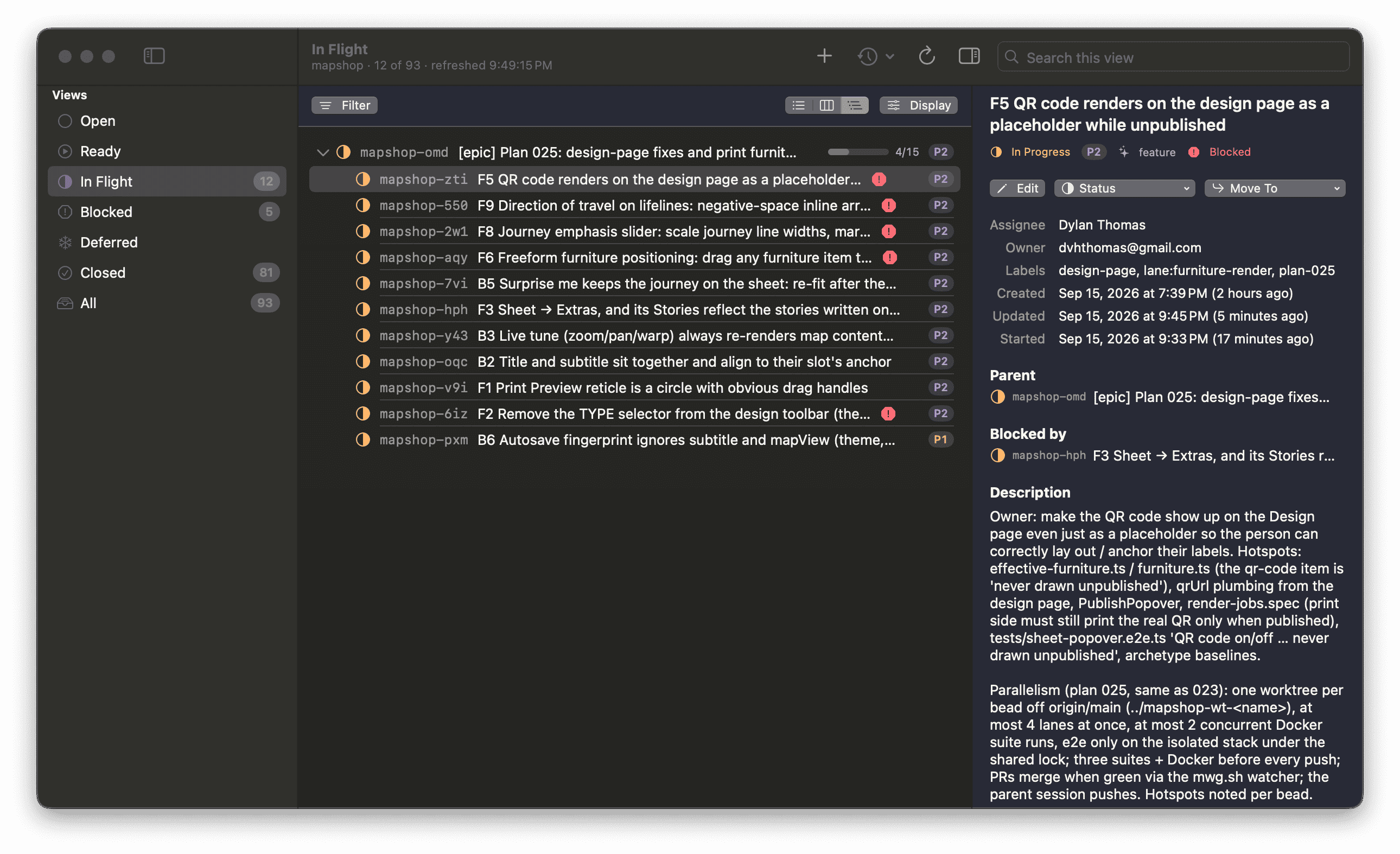
Twelve beads in flight on one project, and what the selected one is blocked by
The panel on the right shows what the selected bead is blocked by, which epic it belongs to, and when it was last touched. The same database on a board:
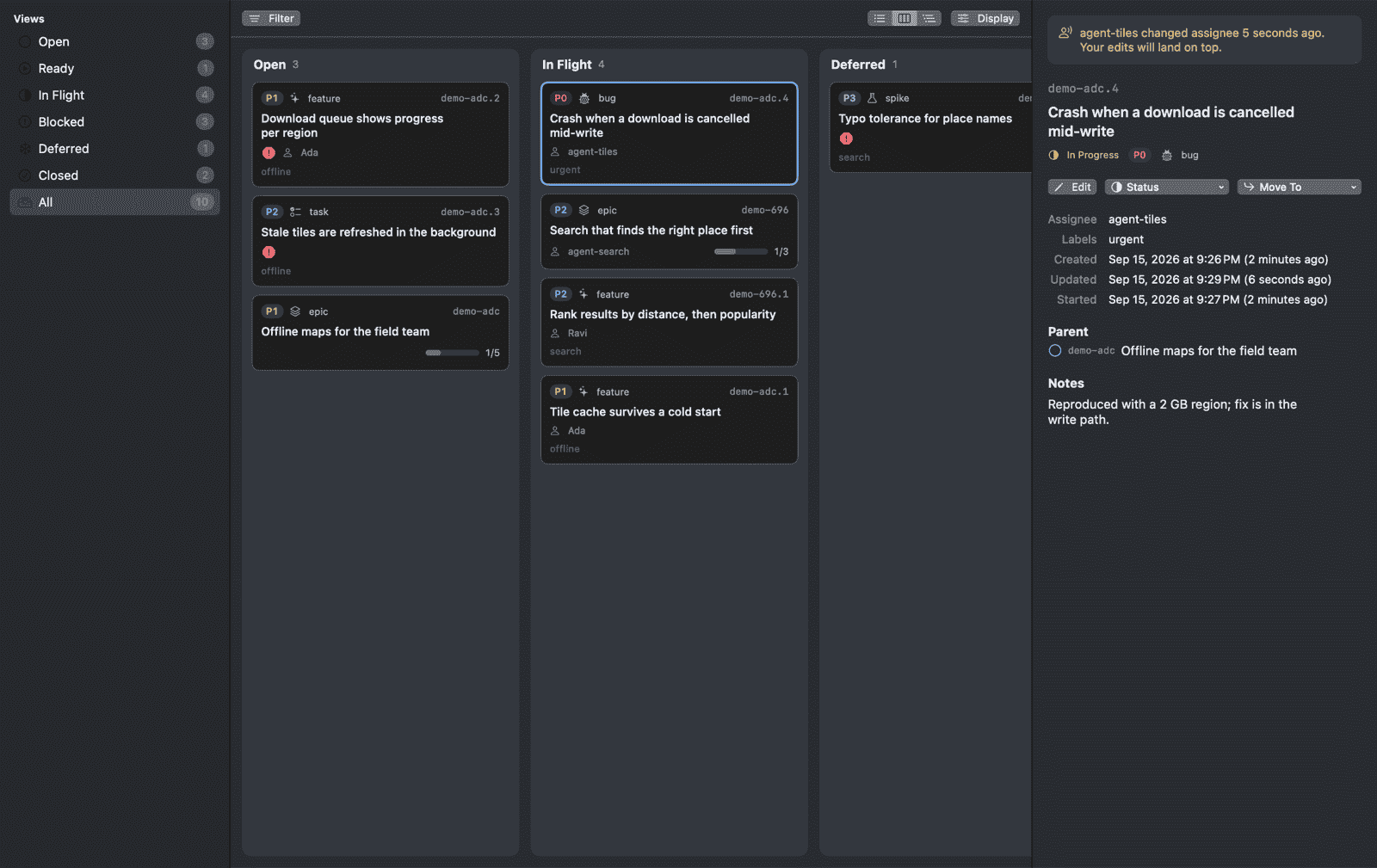
The board, where the grouping decides what a drop means
Every write Beady makes is a bd command, so it can’t break anything bd wouldn’t break on its own. What it can do is act on a stale view: I read a bead, an agent reassigns or closes it while I’m looking, and my edit lands on top of theirs. bd update --claim is atomic, but a plain update has no compare-and-swap. So changes go behind a sheet that shows the exact commands it’s about to run, warns me if another actor touched that bead recently, and re-reads afterwards to see what landed.
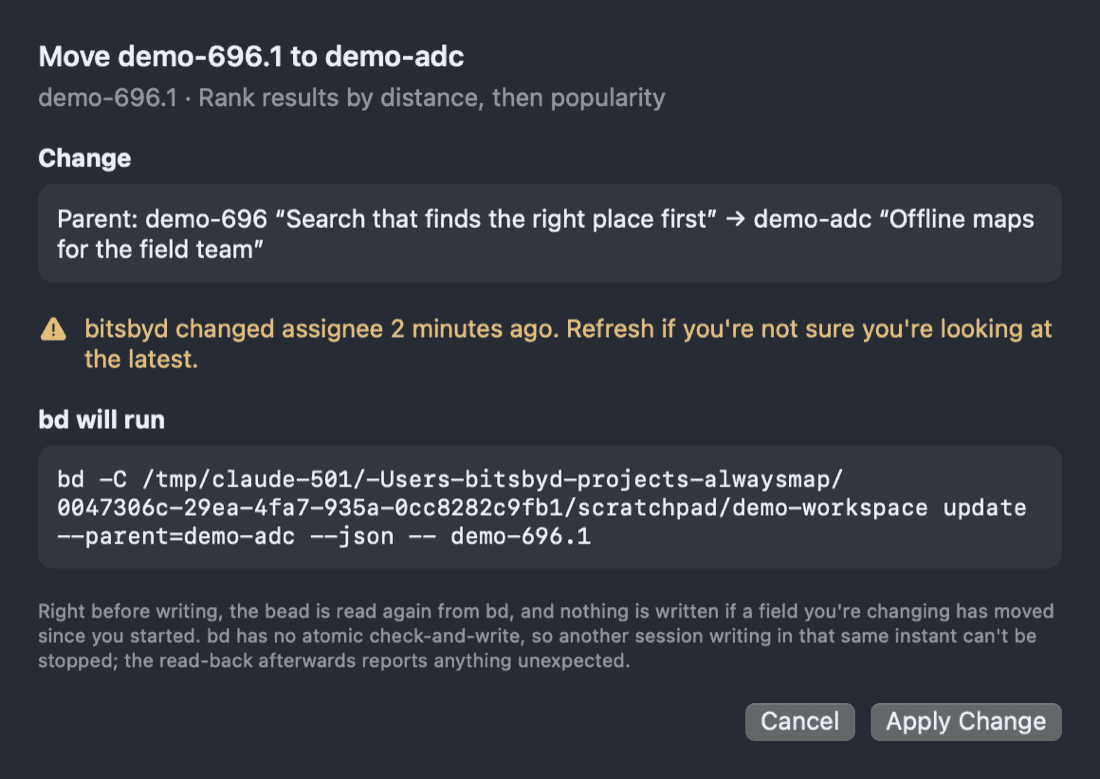
Nothing is written until the commands are on screen
The code is at github.com/dvhthomas/beady if you want it, though this is very much an app built for me. The Homebrew install is at the top of this post. If you’d rather build it yourself, or you’re on an Intel Mac, it’s one script, and a self-built app skips the quarantine step:
| |
Then ⌘O a project folder that has a .beads directory in it.